
Conference: the listener's view
You were sent a link. No account needed, the host pays - just pick your language and put on headphones.
1
Joining the room All plans
A link or a QR code, then a language and a name. Any name will do - a real full name is not needed and we ask you not to enter one.
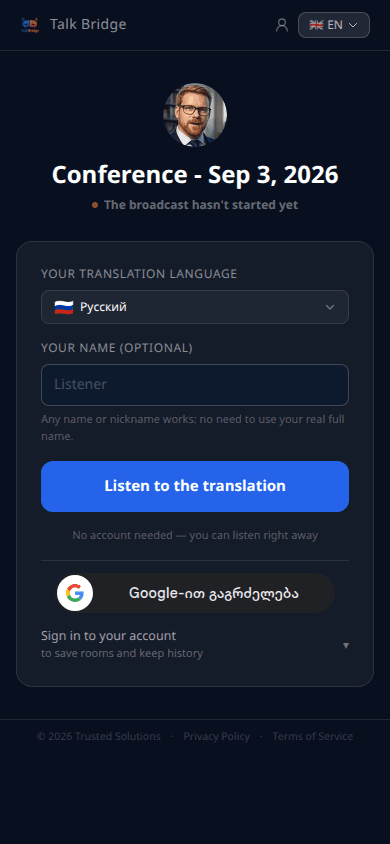
- 1Your translation language - the listener picks the language they WANT to hear and read in.
- 2Your name - any name or nickname, real names are not required. Can be left empty.
- 3The Join button - and the listener is in.

Every listener picks THEIR own language: one listens in Turkish, another in German - at the same time, from one talk.
2
During the room All plans
The feed shows the original phrase and its translation into your language. Voice-over can be turned off if you prefer to read.
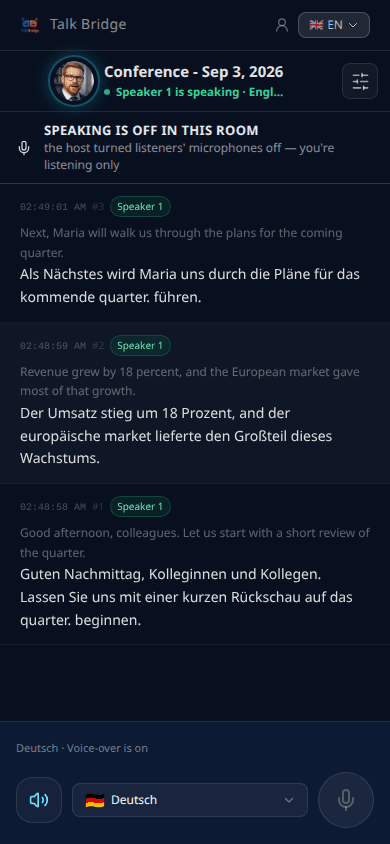
- 1The header says whether speech is going right now.
- 2The language of translation is separate from the interface language: switching one does not change the other.
- 3If the connection drops, the page returns you to the room by itself, with the same name and language.
3
When a listener speaks All plans
The right to speak is given by the host in the room settings. Where it is off, the screen says so plainly instead of hiding the button.
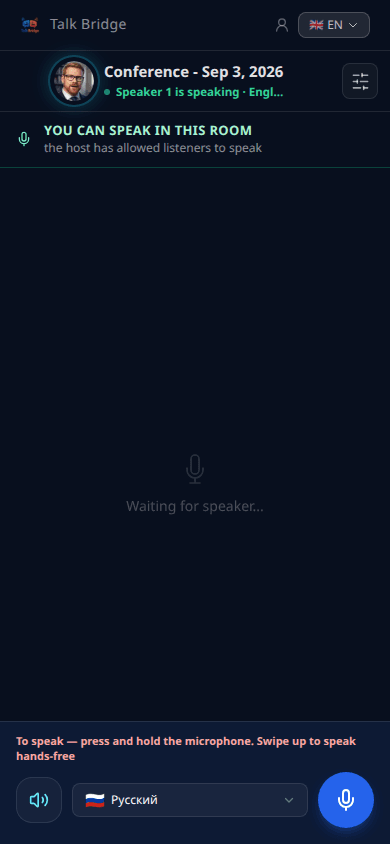
- 1Hold the button while you speak, like a walkie-talkie.
- 2Your phrase is translated for everyone else into their own languages.
- 3The host can mute listeners: the right stays, the microphone is simply switched off until you press again.