
Konferans: dinleyicinin bakışı
Size bir bağlantı gönderildi. Hesap gerekmez, ödemeyi sunucu yapar - dilinizi seçip kulaklığı takın.
1
Odaya katılma Tum planlar
Bir bağlantı ya da QR kod, ardından dil ve isim. Herhangi bir isim uygundur: gerçek ad soyad gerekmez, girmemenizi rica ederiz.
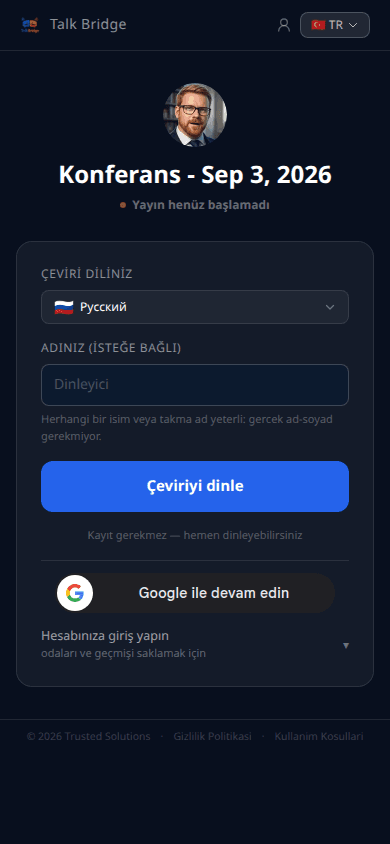
- 1Çeviri diliniz - dinleyici duymak ve okumak İSTEDİĞİ dili seçer.
- 2Adiniz - herhangi bir ad veya takma ad, gercek kimlik gerekmez. Bos da birakilabilir.
- 3Katıl düğmesi - ve dinleyici içeride.

Her dinleyici KENDİ dilini seçer: biri Türkçe, diğeri Almanca dinler - aynı anda, aynı konuşmadan.
2
Oda sürerken Tum planlar
Akışta özgün cümle ve sizin dilinize çevirisi görünür. Okumayı yeğliyorsanız seslendirmeyi kapatabilirsiniz.
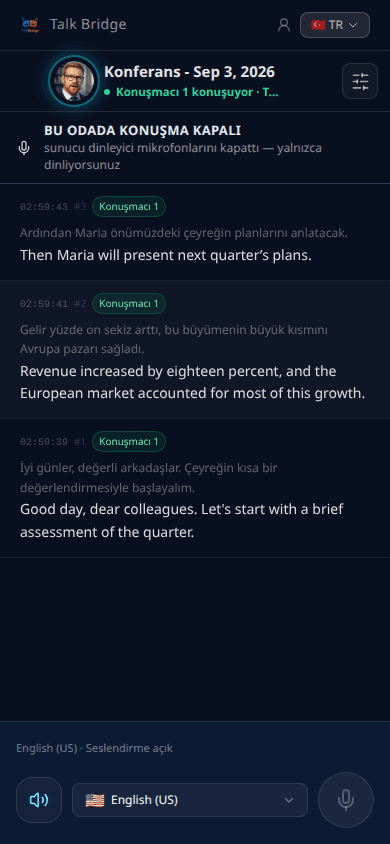
- 1Başlık, şu anda konuşma olup olmadığını gösterir.
- 2Çeviri dili ile arayüz dili ayrı ayarlardır: birini değiştirmek diğerini değiştirmez.
- 3Bağlantı koparsa sayfa sizi aynı isim ve dille odaya kendisi geri döndürür.
3
Dinleyici konuştuğunda Tum planlar
Konuşma hakkını sunucu oda ayarlarından verir. Hak yoksa ekran bunu açıkça yazar, düğmeyi sessizce gizlemez.
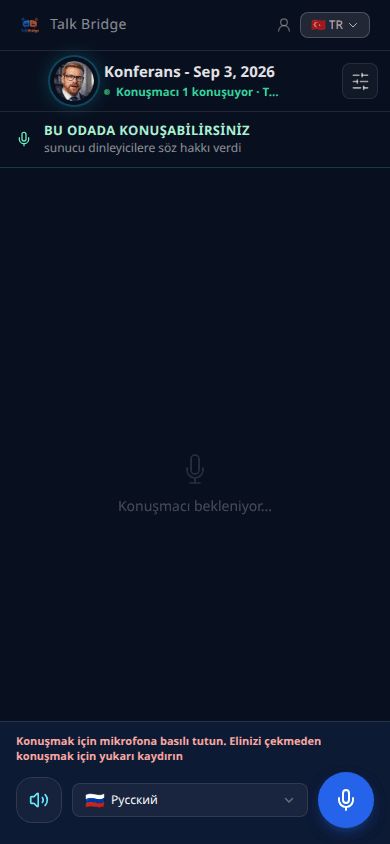
- 1Konuşurken düğmeyi basılı tutun - telsiz gibi.
- 2Cümleniz diğerlerine kendi dillerinde çevrilir.
- 3Sunucu dinleyicilerin mikrofonunu kapatabilir: hak kalır, mikrofon yalnızca bir sonraki basışa kadar kapalıdır.